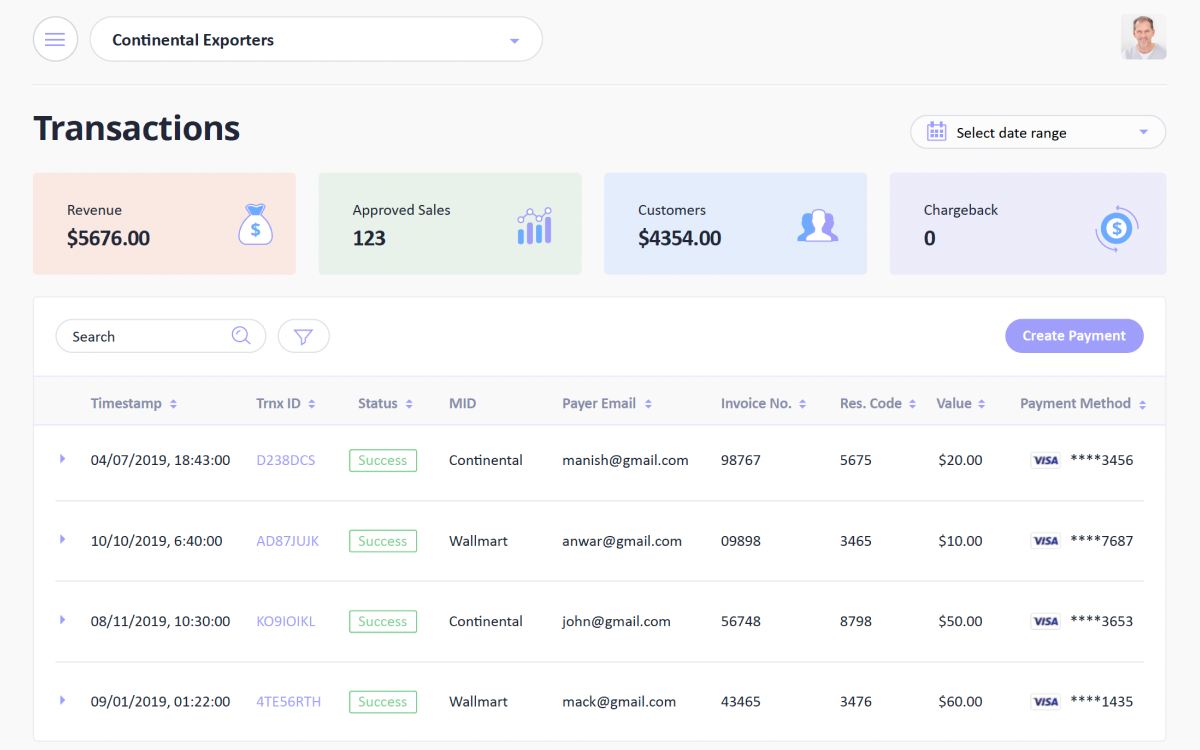
The landscape of digital design continues to evolve, and staying current with proven principles remains essential for creating products that users love. Modern design demands a balance between aesthetic appeal and functional clarity, ensuring that every interface serves its purpose while delighting those who interact with it.
Design for Accessibility First
Creating inclusive experiences has become a fundamental requirement rather than an afterthought. Proper contrast ratios ensure text remains readable across different lighting conditions and devices. Color should never be the only method of conveying information, as this excludes users with color vision deficiencies.
Touch targets need adequate spacing and size, particularly on mobile devices where precision can be challenging. Screen reader compatibility must be baked into every component, with semantic HTML and proper ARIA labels guiding users through content logically.
Embrace Progressive Disclosure
Users feel overwhelmed when faced with too many options at once. Progressive disclosure presents information in layers, revealing complexity only when necessary.
The primary interface should focus on the most common tasks, with advanced features tucked behind additional interactions. This approach reduces cognitive load and helps users build confidence through successful completion of simple tasks before moving to more complex operations. Each layer should feel like a natural progression rather than a jarring shift in experience.
Maintain Visual Hierarchy
The human eye naturally seeks patterns and structure. Strong visual hierarchy guides users through content by establishing clear relationships between elements. Size, color, contrast, and spacing all contribute to this hierarchy. Important actions should stand out through larger buttons, bolder colors, or prominent placement.
Secondary options can use more subdued styling without disappearing entirely. Typography plays a crucial role here, with heading levels creating a clear content structure that both sighted users and screen readers can navigate easily.
Prioritize Performance
Speed directly impacts user satisfaction and business metrics. Every millisecond counts when users decide whether to stay or leave.
Optimize images ruthlessly, choosing appropriate formats and sizes for each use case. Lazy loading defers non-critical resources until they become necessary. Minimize unnecessary animations that might look impressive but slow down interactions. Users judge the quality of your entire product by how quickly it responds to their actions, so performance cannot be treated as a secondary concern.
Create Consistent Patterns
Consistency builds familiarity and reduces the learning curve. Users should be able to predict how interface elements will behave based on previous interactions within your product.
Buttons should look and act like buttons throughout the entire experience. Navigation structures should remain stable across different sections. Error messages should follow the same format and tone. This consistency extends beyond your own product to include platform conventions that users already understand from other applications.
Design for Touch and Gestures
Mobile devices dominate internet usage, making touch-friendly design mandatory. Interactive elements need sufficient size and spacing to prevent accidental taps.
The minimum touch target should be at least 44 by 44 pixels, with adequate space between adjacent targets. Common gestures like swipe, pinch, and long-press should enhance rather than complicate the experience. Remember that users interact with devices in varied contexts, from one-handed phone use while walking to tablet use while sitting comfortably.
Provide Clear Feedback
Users need confirmation that their actions have registered. Button states should change on interaction, showing pressed, loading, and completed states.
Form submissions should display progress indicators for longer operations. Error messages must explain what went wrong and how to fix it, using plain language instead of technical jargon. Success states should feel rewarding without being disruptive. Every interaction becomes an opportunity to build trust through clear communication.
Simplify Decision Making
Every choice requires mental energy. Reducing unnecessary decisions helps users complete tasks with less friction. Default options should work for most people in most situations.
Present the recommended choice clearly while still allowing customization for those who need it. Break complex processes into smaller steps rather than presenting one overwhelming form. Guide users through decisions with contextual help that appears exactly when needed.
Use White Space Strategically
Empty space gives designs room to breathe and helps content stand out. White space between sections creates clear boundaries and improves scanability.
Generous padding around text makes reading more comfortable. Spacing between interactive elements prevents mistakes and adds a sense of quality to the interface. Dense layouts might seem efficient, but they often overwhelm users and hide important information in the clutter.
Design for Real Content
Lorem ipsum and placeholder text hide problems that emerge with real data. Design with actual content from the start, including edge cases like very long names, missing profile pictures, or empty states.
Consider how the interface adapts when users have no data yet versus when they have too much data. Single-item displays should work just as well as lists with hundreds of entries. Real content reveals layout problems, truncation issues, and scaling challenges that perfect dummy data conceals.
Respect User Attention
Notifications and interruptions should be reserved for truly important moments. Every modal dialog, popup, or alert competes for limited user attention.
Question whether each interruption genuinely helps users or primarily serves business goals. Allow users to customize their notification preferences with granular controls. Banner blindness has trained users to ignore anything that resembles an advertisement or unnecessary interruption, so use these patterns sparingly.
Test with Real Users
Assumptions about user behavior often prove incorrect when confronted with reality. Regular usability testing reveals friction points that designers miss due to familiarity with their own work. Watch users struggle with tasks you thought were simple.
Listen to their questions and confusion. Quantitative metrics tell you what users do, but qualitative research reveals why they do it. Both perspectives are necessary for creating truly effective experiences.
The principles outlined here represent foundations rather than fleeting trends. They focus on fundamental aspects of human perception, cognition, and behavior that remain stable even as technology changes.
Mastering these principles creates products that feel intuitive, perform reliably, and scale gracefully as your user base grows. Great design ultimately serves users first while supporting business objectives as a natural consequence.
Frequently Asked Questions about UI UX Design Principles
What are 5 principles of UX design?
User centered design, Usability, consistency, visual hierarchy, and accessibility
What are the 5 elements of UX design?
Strategy, scope, structure, skeleton, and surface.